Showing posts with label AdobeAIR. Show all posts

Tuesday, 9 December 2008

Signing Adobe AIR files with Authenticode Certificates

There are some things that always seem a little trickier than they should be. Renting an apartment in London that has working heating and hot water is one of them, converting an Authenticode certificate from SPC and PVK files to a format that you can sign Adobe AIR files with is another.

Since I still haven't figured out the former, I'm going to write about the latter.

First things first, if you're going to get a certificate solely for signing AIR files, then buy one from Verisign or Thawte specifically for AIR. It's just easier.

If, however, you want to use your certificate to sign .NET applications as well, then get a Microsoft Authenticode certificate. You can use that certificate to sign AIR apps and well as .NET apps. We got our Authenticode certificate from Verisign, but there are other vendors. If this is what works for you, then the following might be helpful. If you have haven't already done so, go away and buy the certificate now - I'll see you again when you have downloaded a PVK file and an SPC file.

So, let's skip forward a few days. You've got your PVK file (the private key), and the SPC file. You're probably wondering how to turn those files in to a PFX file that you can use with ADT to sign files. Hopefully, these steps should help. Oh, I'm assuming that you're using a PC here...

Firstly, you need to ask yourself two questions:

  1. Do you feel lucky?

  2. Can you find a tool called pvk2pfx on your machine. This is a pain to get hold of, but lives in bin directory of most Microsoft SDKs.

If you're lucky AND you can find pvk2pfx, then skip forward a little. If you can't find it, then read on.


I don't have pvk2pfx, I need something else


Worry not, this is still completely possible...

  1. Get a tool called pvkimprt. You can download it from Microsoft. Run the self extracting whatsit, then run the installer, and make a note of its final resting place.

  2. Open up a commmand prompt (Start, Run, "cmd").

  3. Change to the directory where pvkimprt ended up.

  4. Run:
    pvkimprt -PFX <path\to\cert.spc> <path\to\key.pvk>

  5. Choose the following options:

    Choose to export the private key...

    Choose the PFX format, choosing to include certificate chain and use strong protection.

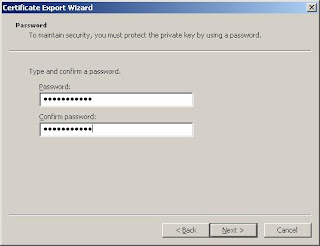
    Choose a password...

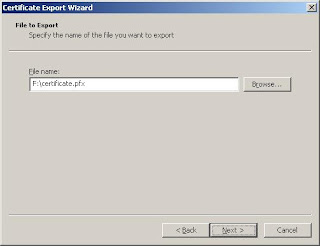
    Select a location to save the pfx file

    This is what success looks like...

  6. You can use the resulting pfx file to sign an Adobe AIR file with adt.


You're done! You might want to ignore the rest of this post, it will make you wish you were luckier. Any questions/mistakes/omissions, feel free to ask...

I'm lucky, I have pvk2pfx

This is much easier. Simply:

  1. Open up a commmand prompt (Start, Run, "cmd")

  2. Change to directory where you found pvk2pfx.

  3. Run:
    pvk2pfx -pvk <path\to\key.pvk> -pi <pvk password> -spc <path\to\cert.spc> -pfx <path\to\output.pfx> -po <new password for pfx file> (all on one line)

  4. You can use the resulting pfx file to sign an Adobe AIR file with adt.


I hope that was helpful!

Thursday, 28 August 2008

Logging in Flex/Air: Filters behaving badly...

I'm a firm believer in diagnostics - in .NET land I just can't live without log4net. The mx.logging.* namespace in Flex 3 appears to give us some similar functionality (I'm talking about restricting loggers to certain "categories" here) but without the lovely configuration framework of log4net.

In an app we're writing at the moment, I was seeing some wierd behaviour. Basically, the logging targets were just not obeying their filters, meaning every message was getting written everywhere. Not good. At all.

So I did some digging and found two things that surprised me:

1. Setting a level on a target will call Log.addTarget() - probably prematurely


When stepping through the source code of the Flex logging framework, I found this bit of code in AbstractTarget:

public function set level(value:int):void
{
// A change of level may impact
// the target level for Log.
Log.removeTarget(this);
_level = value;
Log.addTarget(this);
}

This highlighted line is the culprit. The contents of the addTarget method set up logging restrictions based on the value of the filters array. This has two consequences. Firstly, if you follow Adobe's guidelines you'll end up running through the addTarget code twice, once when you set the level, and once when you actually call Log.addTarget yourself - not awful, but not great either - lots of loops, which gets bad when you've got a lot of Loggers.

The other consequence was the cause of my pain...

2. You have to set your filters before you set your level


Yep. That's right, the following code is bad:
//BAD CODE, DON'T USE
var target : TraceTarget = new TraceTarget();
target.level = level; //This should not come first.
target.filters = filters; //This is pretty much ignored

Here's why:
  1. The default value of target.filters is ["*"], which will means the target listens to log messages from every logger.
  2. When you set target.level, Log.addTarget is called, and all the filter magic happens. Except that you haven't set the filters yet. So it uses the default value ["*"], and your filter listens to everything. This was what was happening in our code.
So, the correct code should be:
var target : TraceTarget = new TraceTarget();
target.filters = [com.mydomain.myproject.MyClass,mx.rpc.*]; //Set first
target.level = level; // set second.

In this example, a TraceTarget is created which will only listen to Loggers that have a category that is equal to "com.mydomain.myproject.MyClass" or begins with "mx.rpc". It is not at all obvious, but you the above code will also start Logging, as setting target.level also calls Log.addTarget().

The observant among you may have noticed that if Adobe improve the behaviour of setting target.level in the future, you may find that your logging stops because addTarget never gets called. If you're worried about that, you can do the following:
var target : TraceTarget = new TraceTarget();
target.filters = [com.mydomain.myproject.MyClass,mx.rpc.*];
Log.addTarget(target); //honours the filters
// setting target.level will
// remove the target, then add it again.
target.level = level;
Still inefficient, but at least it is future proof. I hope that helps somebody, somewhere...

Tuesday, 15 July 2008

OutOfMemoryError while using mxmlc and ant

My first blog post. Very practical too...

Basically, I'm working on a fancy Adobe AIR app right now. As part of that, we are implementing an automated build process using CruiseControl and such. I'm using ant, and the flexTasks provided by Adobe. All was going pretty well, until this happened:
[mxmlc] Loading configuration file C:\Program Files\Adobe\Flex3SDK\frameworks\air-config.xml
[mxmlc] Error: null
[mxmlc]
[mxmlc] java.lang.OutOfMemoryError

After a bit of googling, there was no obvious solution. I did see mentions of setting the ANT_OPTS environment variable. So this is what I did (I'm running Windows Server 2003 btw...):

  1. Hit Windows-Break to open the "System Properties" dialog.
  2. Go to the advanced tab.
  3. Click "environment variables"
  4. In the System variables section, click New.
  5. Enter the variable name as ANT_OPTS, and the value as -Xmx512m.
  6. Click "OK".
If you were using a command prompt, you'll need to close it down and re-open it to use the new settings. Try running your ant script again, and your error should be gone.

You can find a much nicer visualisation of that process here. If you are on a UNIX box, then you'll need to:
set ANT_OPTS=-Xmx512M; export ANT_OPTS
from the shell.

If you want to know more, you should read about the Java virtual machine's memory tuning options. I couldn't find any documentation about the ANT_OPTS environment variable.